Getting Started
|
Q: Do I need an AWS account to participate? A: Yes. You'll need a free AWS account to use Strands Agents. Sign up here. The free tier covers a lot, and registered participants can also request $50 in AWS Promotional Credits. |
|
Q: How do I request AWS credits? A; Once you're registered, complete the form here. Requests must be submitted by Sept 11, 2026 at 12pm PT. Credits are available while supplies last and are subject to AWS Promotional Credits terms. |
|
Q: I'm a beginner, can I still participate? A: Absolutely. Strands Agents is designed to get you from zero to a working agent in under 20 minutes. Start with the Quickstart guide or the beginner walkthrough on Builder Center. The Discussion Board and Discord are great for questions; the community is friendly. |
|
Q: Do I need to use AWS AgentCore? A: No. AgentCore is encouraged and will strengthen your Technical Implementation score, but it's not required. Build with Strands Agents as your foundation and deploy however works for you. |
Teams & Submissions
|
Q: Can I work in a team? A: Yes. There's no limit on team size. You can also enter individually or an organization. |
|
Q: Can I submit more than one project? Yes, but each submission must be unique and substantially different from your others. |
|
Q: Can I use existing code or open source libraries? A: Your project must be newly created during the submission period (August 10 – September 14, 2026), but per the Official Rules, "Participants may use standard development tools, including frameworks, libraries, starter templates, and AI coding assistants, but must disclose any other pre-existing code or work incorporated into the Project." So open source libraries, frameworks, starter templates, and AI coding assistants are all fair game. However, any other pre-existing code or prior work you incorporate must be disclosed. Keep in mind that "the work described and submitted must have been built during the Submission Period." The project itself needs to be newly created during that window, not an existing project you're repackaging. If you're unsure whether something counts as a "standard tool" versus "pre-existing work" that needs disclosure, when in doubt, disclose it. |
Submissions & Requirements
|
Q: What does my video need to include? A: Your video (max 5 minutes) must include a working demo of your project AND a pitch covering: 1) what problem you're solving, 2) who it's for, and 3) why it matters. Slides, screen recordings, and voiceover are all fine. No need to appear on camera if you don’t want to. |
|
Q: Can I enter my Project into more than one Track? A: No, your Project may only fall into one track. Multiple Submissions are allowed, but each submission must be unique and substantially different from your others. |
|
Q: Which track should I pick if my project could fit more than one? A: Pick based on who the primary user is, not what the agent technically does. Ask yourself: is this for someone managing their own life (Everyday Agents), a professional doing skilled work (Pro Agents), or a group of people coordinating together (Good Neighbor Agents)? If your idea genuinely spans two, you can submit multiple projects, just make sure each one is unique and substantially different. |
|
Q. Can I build for a real nonprofit, community group, or employer I'm part of? A. Yes. Building for a real organization you're involved with is encouraged, especially for Good Neighbor Agents and Pro Agents. Just make sure you have permission to use any of their data, materials, or workflows, and that your submission doesn't expose anything confidential. If you're not sure what you can share, use placeholder or synthetic data instead.
|
|
Q. Can I use real personal or sensitive data (client records, health info, financial info)? A. We recommend against it. Use synthetic, anonymized, or publicly available data instead. There's usually an open dataset that can stand in for the real thing. If your submission includes real personal, health, financial, or otherwise sensitive data, you're responsible for having the right to use and share it, and reviewers may flag anything that looks like real PII. |
|
Q. Does my repository need to be public? A. Yes. Your code repo must be publicly accessible and include an MIT or Apache open source license, visible in the About section.
|
|
Q: Can I publish more than one blog post on builder.aws for bonus points? A: Yes. Posts must be publicly published on builder.aws.com before the submission deadline. See Full Rules for details. |
|
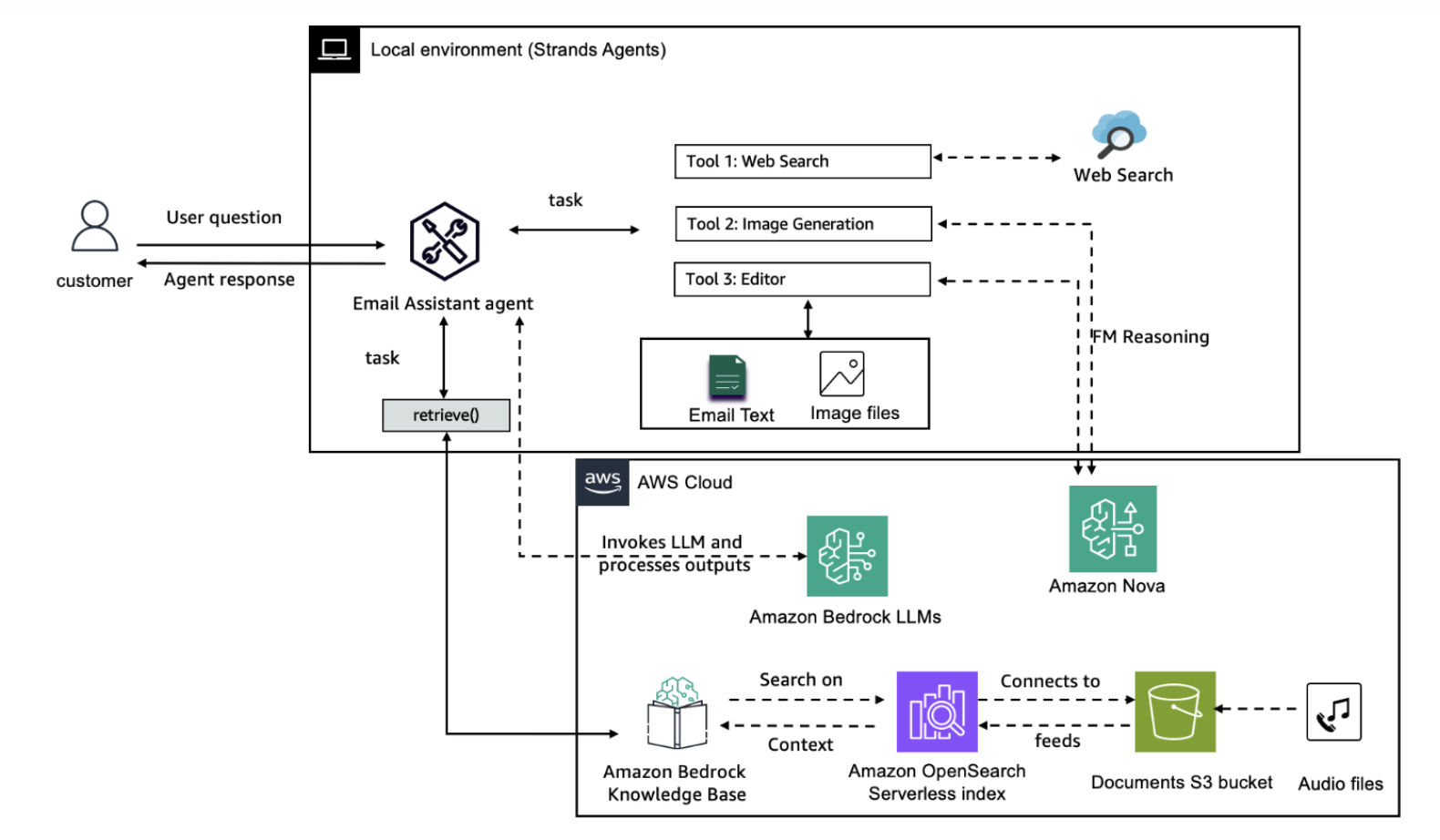
Q: What should my architecture diagram include? Your architecture diagram should give judges a clear picture of how your agent is built and how the pieces connect. It doesn't have to be beautiful - a clear, labeled diagram including the following:
|
|
Q: What is an AWS Builder ID and where do I get one? An AWS Builder ID is a personal profile that complements any existing AWS accounts you may have. Think of it as your AWS identity as a person, separate from an AWS account, and free to create. You'll need one to submit to this hackathon. Here's how to get it:
When the submission form asks for your AWS Builder ID, enter the email address you used to create it. You can use the same email for your Builder ID and for your AWS account root user if you already have one. Already have one? You can view and manage your Builder ID profile at https://profile.aws.amazon.com. Your Builder ID also gives you access to AWS Builder Center, where you'll publish your bonus blog post. |